Computer vision + LLM · 2025
TaskBox
Tell it what you want to do, and it finds the right element on the screen.
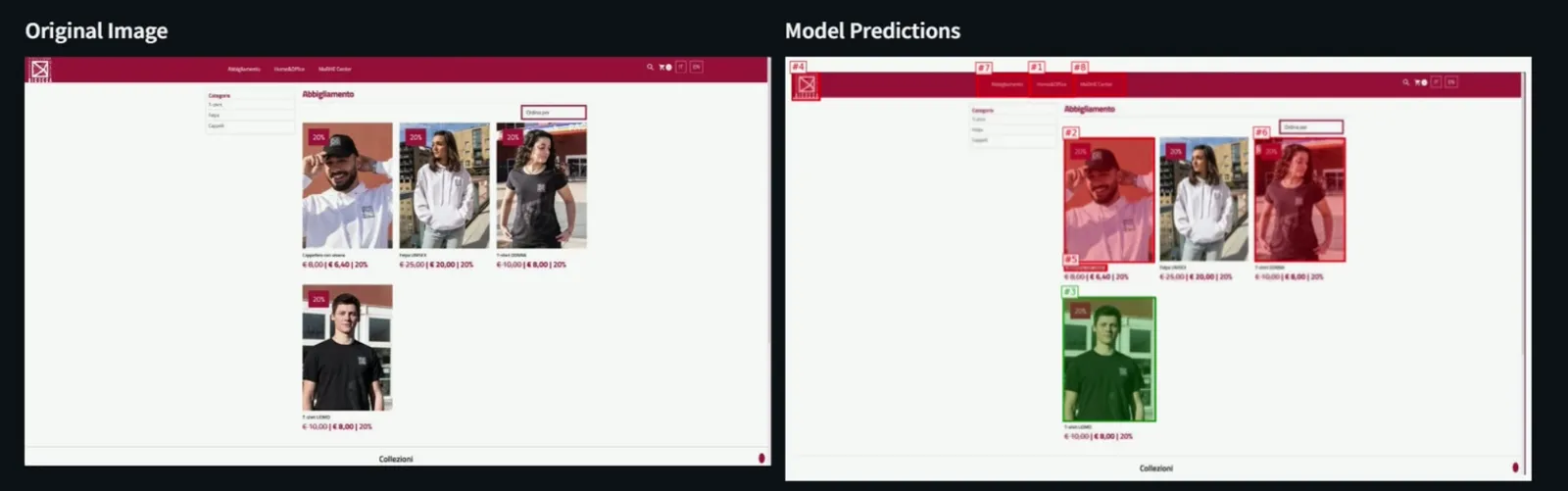
Automating a user interface usually means hard-coding selectors that break the moment a page changes. TaskBox looks at the screen the way a person would instead.
How it works
You upload a screenshot and describe a task in plain language, like “click the login button”. A fine-tuned YOLO model draws bounding boxes around the interface elements, then Gemini reasons over those candidates and picks the one that fits the task.
The split matters. The detector handles what is on the screen, the language model handles what you meant, and the result is a highlighted element you can check at a glance.
What’s inside
- A full training pipeline, from dataset download and YOLO format conversion through to inference
- Binary and multi-class classifiers, comparing CLIP and CNN approaches
- A Streamlit interface with live detection, adjustable confidence thresholds and task history
- Agent recommendations for clicks, text input, zooming into crowded areas and multi-step tasks